
How to Listen to Kindle Books Without Audible (2026)
No audiobook edition? How to listen to Kindle books without Audible: free built-in options, desktop workarounds, and premium AI voices compared.
Published • By Mike
If your Kindle book has no audiobook edition, you can still listen to it without Audible. On your phone, Amazon's free Assistive Reader will read eligible books aloud. On a desktop, where Kindle for Web has no built-in read-aloud, you can capture the book's text and play it through a text-to-speech tool you choose.
That second path matters because plenty of books never get an audiobook edition at all. Niche technical titles, older backlist books, self-published work: no narrator ever recorded them.
This guide covers the free built-in options first, then the desktop route most guides skip, then an honest comparison of the paid AI voices.
Does Your Kindle Book Even Have an Audiobook Edition?
Check the book's Amazon product page. If an Audible version exists, it appears as a format option next to Kindle and paperback, often with an "Add Audible narration" upsell. If Amazon lists no audiobook format, check Audible and your library's catalog separately; if neither carries an edition, text-to-speech is the practical alternative.
That distinction changes your options. If an audiobook exists and you just don't want to pay Audible prices, your library may carry it for free through Libby. If you prefer human narration, check there first.
If no edition exists, you're in text-to-speech territory. Everything below is for you.
What's the Free Built-In Way to Listen?
On your phone, use Assistive Reader. Open the book in the Kindle app, tap the page, tap the Aa menu, choose More, and switch on Assistive Reader. The app reads the book aloud with adjustable speed. It's free, it's built in, and for phone listening it's genuinely enough.
A naming note, because it causes real confusion: older guides refer to related Kindle features as "Text-to-Speech" or "Read Aloud," which is why forums are full of people saying the feature "isn't there" on their app. In current app versions, look for Assistive Reader.
Two more free options:
- Alexa. Say "Alexa, read [book title]" and a compatible Echo device reads supported Kindle titles from your library.
- VoiceView. Supported Kindle e-readers offer this screen reader with audio over Bluetooth, and some newer models carry Assistive Reader directly; check Amazon's documentation for your model.
If Kindle's built-in accessibility path failed you, that's a different problem with its own solutions: see our accessibility guide.
The catch with all the built-ins: they live on your phone, your Echo, or your e-reader. None of them reach Kindle for Web on a desktop, which is where many people actually read.
How Do You Listen on a Desktop or Kindle for Web?
Kindle for Web (the browser reader at read.amazon.com) has no built-in read-aloud, and browser TTS overlay tools often can't reach the text because the reader renders pages as images. The top-ranking article on this topic admits its method couldn't be replicated in the browser reader. Reddit threads report Speechify failing on it outright.
The route that works is to get the book's text out first, then play that text in the TTS tool you prefer. TextMuncher is a Kindle book capture tool: it captures books you bought that open in Kindle for Web, hands-free, as page images in a ZIP — upload the ZIP to the web app to extract the plain text.
Here's the full workflow:
- Install the extension (Chrome or Firefox) and open your book at read.amazon.com.
- Run a capture. The extension turns pages and screenshots them for you, hands-free, and packages the page images into a ZIP. No source files, no conversion software.
- Upload the ZIP at textmuncher.com. The default Speed mode runs OCR in your browser and extracts the plain text.
- Feed the text to your TTS tool. Paste it into Edge's free Read Aloud, or import it into Speechify or ElevenReader for premium AI voices.
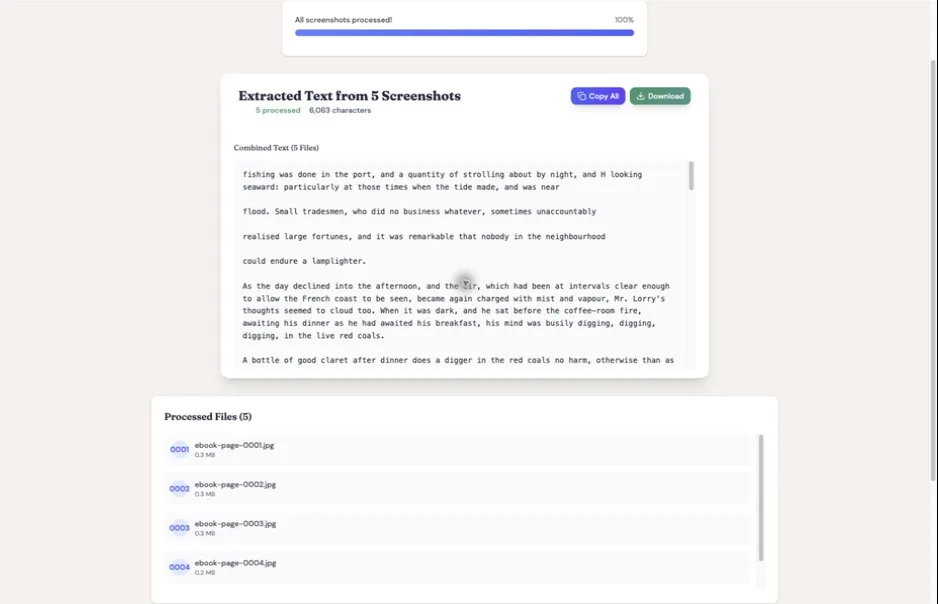
When I built TextMuncher, this exact request kept arriving from users: "I'm using it to listen to kindle books that there isn't an audiobook for. I just have so much more time to listen to books than read them these days." That's the fit. TextMuncher supplies the text; your TTS tool makes the audio. We don't generate audio ourselves, and we won't pretend otherwise.
One honest boundary: capture works on books that open in Kindle for Web, which covers nearly every book in a typical library, but not all of them. Your first 30 automated-capture pages are free, so you can confirm your book works before paying anything.
The same extracted text feeds other listening workflows too, like generating a podcast-style Audio Overview from the text in NotebookLM, or any of the AI reading workflows built on your own library.
Which Premium AI Voices Are Worth It?
Free voices are serviceable; many listeners find the paid voices dramatically more natural. What matters is matching the tool to how much you listen.
| Tool | Cost | Strengths | Watch out for |
|---|---|---|---|
| Edge Read Aloud | Free | Solid neural voices built into the Edge browser; paste text and press play | Tied to the browser; minimal library features |
| ElevenReader | Free tier (about 10 hrs/month) | Among the most natural voices | Needs your own text files, so pair it with extracted text |
| Speechify | ~$139/year | Polished apps, syncing, celebrity voices | Users report a 150,000-word monthly cap on premium voices; doesn't work on Kindle's browser reader directly |
| Libby | Free with a library card | Real human narration | Only works when an audiobook edition actually exists |
Pricing and allowances are current as of August 2026; check each tool's site before subscribing.
If you're testing the waters, start with Edge Read Aloud at zero cost. If you listen for hours weekly, ElevenReader's free tier is our pick for voice quality per dollar. For comparing Kindle read-aloud tools in more depth, we keep a separate rundown.
Which Kindle Books Qualify?
Assistive Reader availability commonly depends on the title supporting Enhanced Typesetting. Check the product page's "Product details" section for "Enhanced typesetting: Enabled." Alexa and VoiceView have their own title and device requirements.
For the desktop capture route, the requirement is different: the book must open in Kindle for Web. Open read.amazon.com and check your library. Nearly every book in your library appears there, but a small number of titles don't, and those can't be captured.
Older Kindle e-readers may lack Assistive Reader entirely; VoiceView is the accessibility route on those devices.
Conclusion
If you listen on your phone, Amazon's free Assistive Reader is the answer, full stop. If your book has no audiobook edition and you want to listen at your desk, in better voices, or away from your phone, the working route is text first: capture the book with TextMuncher, extract the text, and let the TTS tool of your choice do the reading. For NotebookLM specifically, extract the text from the same capture, then upload the saved file.
FAQ
Can you listen to a Kindle book that has no audiobook version?
Yes. On a phone, switch on Assistive Reader in the Kindle app (Aa menu, then More) and the app reads the book aloud. On a computer, capture the book's text from Kindle for Web with TextMuncher, then play the extracted text in a text-to-speech tool like Edge Read Aloud, Speechify, or ElevenReader.
Does Kindle for Web have text-to-speech?
No. Kindle for Web has no built-in read-aloud, and browser TTS extensions can't read it because pages render as images rather than selectable text. The working approach is to capture the pages, extract the plain text with OCR, and listen through a separate TTS tool.
Can Speechify read Kindle books?
Not directly. Users report Speechify failing on Kindle's browser reader, and overlay readers generally can't reach the Kindle app's text. Speechify works well once you have the book as plain text: capture the book with TextMuncher, extract the text, and import it.
Is Amazon's built-in read-aloud free?
Yes. Assistive Reader in the Kindle phone app, Alexa reading via an Echo device, and VoiceView on Kindle e-readers are all free. The limits: eligibility varies by title and device, none of them reach Kindle for Web on desktop, and the voices are more robotic than paid AI voices.
Try TextMuncher free - 30 automated-capture pages included. Extract the text, then listen in the tool you choose.