
How to Read Kindle Books with AI (2026)
Read Kindle books with AI using Karpathy's 3-pass method. Extract Kindle text with OCR, then summarize, explain, and ask questions.
• By Mike
In December 2024, Andrej Karpathy (former Tesla AI director, OpenAI founding member, and one of the most influential voices in machine learning) posted a tweet that resonated with millions of readers:
"One of my favorite applications of LLMs is reading books together. I want to ask questions or hear generated discussion (NotebookLM style) while it is automatically conditioned on the surrounding content. If Amazon or so built a Kindle AI reader that 'just works' imo it would be a huge hit."
Patrick Collison, the CEO of Stripe, replied that he'd resorted to buying books from Kobo just to get extractable PDFs. The tweet racked up 2.8 million views. Clearly, this struck a nerve.
A year later, Karpathy built reader3, a lightweight tool for reading EPUBs alongside an LLM. It's elegant, but it only works with EPUB files (the kind you'd download from Project Gutenberg). If your library lives on Kindle (like most people's does), you're still stuck.
This post bridges that gap. Here's how to apply Karpathy's AI reading method to your actual Kindle books.
What Is the Karpathy Reading Method?
In November 2025, Karpathy described his workflow in another viral tweet:
"I'm starting to get into a habit of reading everything (blogs, articles, book chapters,…) with LLMs. Usually pass 1 is manual, then pass 2 'explain/summarize', pass 3 Q&A. I usually end up with a better/deeper understanding than if I moved on. Growing to among top use cases."
That's the method in three passes:
Pass 1: Read it yourself. No AI. Read the chapter cover to cover and form your own understanding first. Notice what clicks, what confuses you, where you disagree.
Pass 2: Summarize and explain. Feed the chapter text to an LLM and ask it to summarize the key arguments, explain difficult concepts, or highlight what you might have missed.
Pass 3: Q&A. Have a conversation with the AI about the material. Ask follow-up questions, challenge the author's claims, connect ideas to other things you've read.
Why does this work? It mirrors what education researchers call active recall. You're not passively absorbing information; you're engaging with it from multiple angles. The first pass gives you raw comprehension. The second pass fills gaps. The third pass cements understanding through dialogue.
Karpathy built reader3 to make this workflow frictionless for EPUB files. You open a chapter, read it, then copy the text into your LLM of choice. Simple, if your books are EPUBs.
Why Kindle Books Are the Hard Part
Reader3 works beautifully with EPUBs from Project Gutenberg or DRM-free publishers. But here's the problem: most people don't read classic literature from Project Gutenberg. They buy books from Amazon.
And Amazon has spent the last two years locking down every extraction method that ever existed:
- February 2025: Amazon removed "Download & Transfer via USB," killing the Calibre DeDRM workflow overnight
- April 2025: Older Kindle for PC versions stopped working for new purchases
- September 2025: My Notebook highlight copying got restricted to the same publisher limits
- September 2025: Firmware 5.18.5 introduced stronger encryption on newer Kindle hardware
The result? You can't copy text from Kindle. You can't download the files. You can't even export your highlights past the 10% cap. If you've hit these walls, you're not alone. Our guide to the Kindle copy limit explains exactly what's happening.
Karpathy's 3-pass method requires the actual text of the chapter. Without extraction, the workflow stops at Pass 1.
The Current Options (And Why They're Painful)
Before I explain what I built, let's be honest about the landscape. Here's what exists for getting Kindle text into an AI:
Amazon's "Ask This Book": Launched December 2025, this lets you ask AI questions about Kindle books directly. But it's iOS only, English only, locked to Amazon's AI model (no ChatGPT, no Claude), and you can't export the responses. The Authors Guild called it a "dangerous precedent". Amazon added the feature without author permission and offers no opt-out. It's also limited to "thousands" of titles, not your full library.
Calibre + DeDRM: For over a decade, this was the go-to. Download your Kindle file, strip DRM, convert to EPUB or text. Dead for new purchases as of 2025. Only works if you have books from before April 2025 and an older Kindle device.
kindle-ai-export (GitHub): An open-source tool that uses Playwright to screenshot each Kindle Cloud Reader page and GPT-4 vision to transcribe them. Clever, but it requires a machine with GPU/WebGL support (cloud VMs produce blank screenshots), an OpenAI API key, and you're paying per-page API costs that add up fast for longer books.
Kindle highlights: You can export your highlights, but Amazon caps you at 10% of the book. Useless for full-chapter analysis with the 3-pass method.
Patrick Collison's workaround: Buy books from Kobo instead, where you can download extractable PDFs. Works, but means abandoning your existing Kindle library.
None of these give you a clean, reliable path from "Kindle book I own" to "full chapter text I can paste into an LLM."
How to Apply the 3-Pass Method to Kindle Books
Full disclosure: I built TextMuncher after getting frustrated with exactly this problem. Here's the end-to-end workflow for applying Karpathy's reading method to any Kindle book:
Step 1: Capture the Chapter
Open your book in Kindle Cloud Reader and start the TextMuncher Chrome extension. It automatically turns pages and captures screenshots hands-free. Capture time varies with chapter length and page rendering, and long runs can stop early or need restarting.
Step 2: Extract the Text
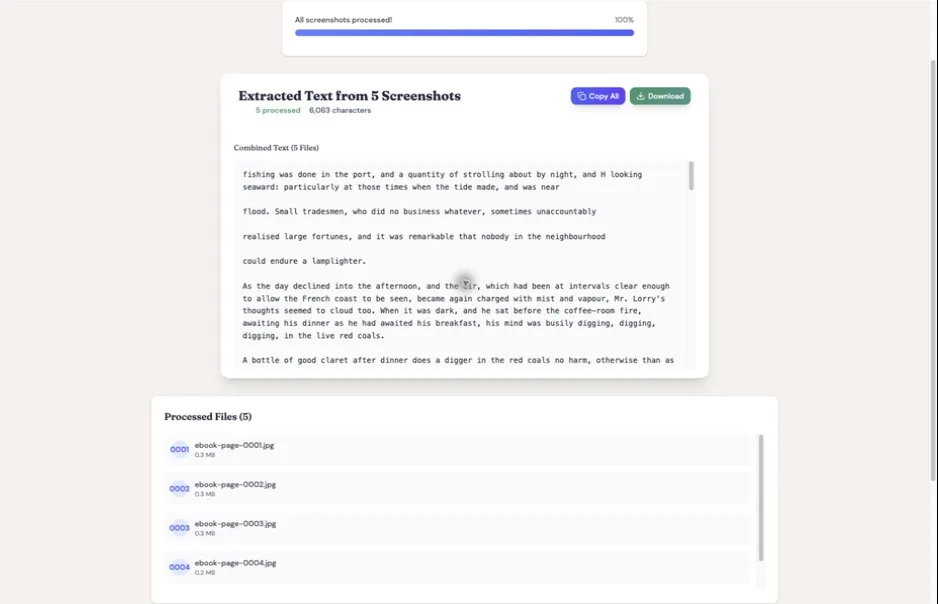
Upload the captured screenshots to textmuncher.com for OCR processing. The extraction runs locally in your browser by default with high accuracy, producing clean, copyable text. In Speed mode, no text is sent to external servers; optional Pro Quality mode sends hard-to-read pages for a cloud second pass. The method behind that claim is public: see the published OCR benchmark and its method.
Step 3: Pass 1: Read the Chapter Yourself
This is the step most people skip, but it's the foundation of Karpathy's method. Read the chapter without AI. Form your own understanding first.
Step 4: Pass 2: Summarize with AI
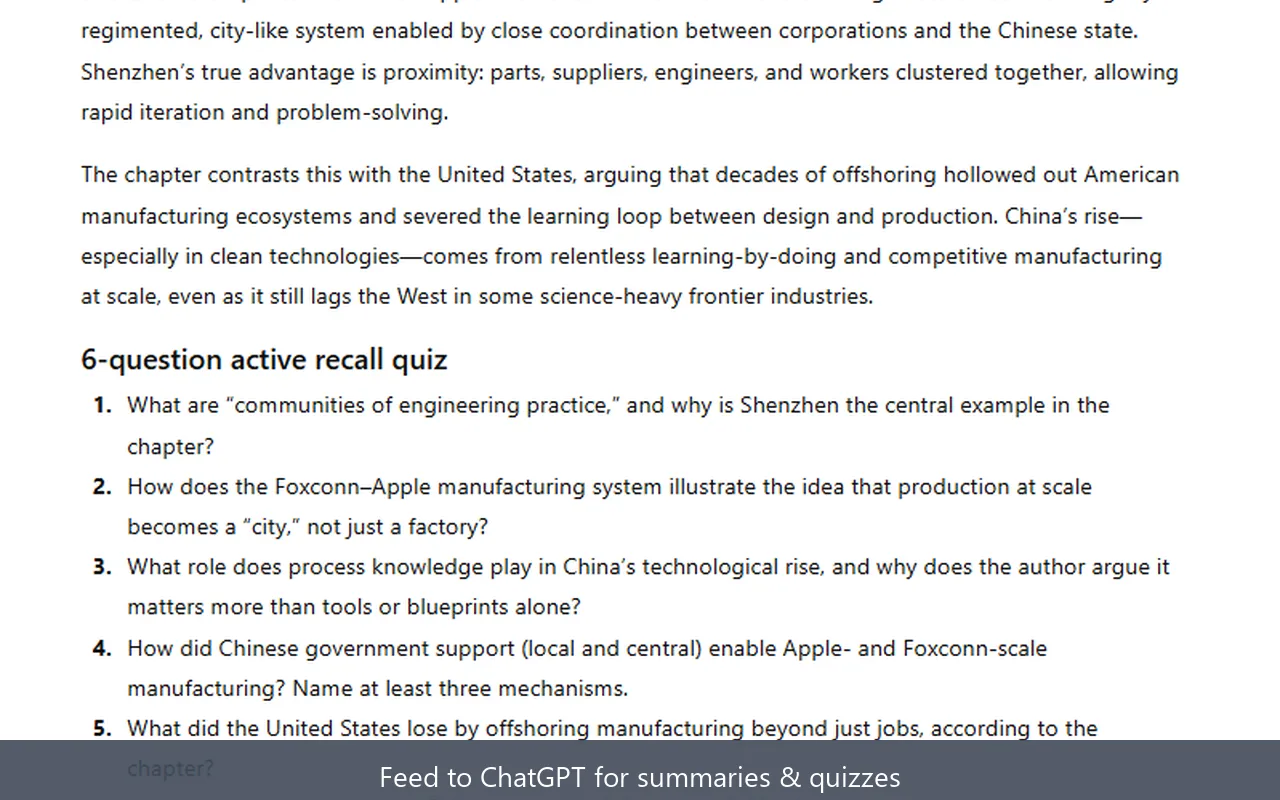
Paste the extracted chapter text into ChatGPT, Claude, Gemini, or whichever LLM you prefer. Here are prompts that work well:
- "Summarize this chapter in 5 bullet points, focusing on the key arguments."
- "What are the 3 most important ideas in this text? Explain each in 2 sentences."
- "Explain [specific concept from the chapter] in simpler terms. What's the author really saying?"
Step 5: Pass 3: Q&A
Now have a conversation with the AI about the chapter. This is where the deeper understanding happens:
- "What's the strongest counterargument to the author's thesis in this chapter?"
- "How does this connect to [concept from a different book or field]?"
- "I didn't understand [specific paragraph]. Break it down step by step."
- "If I only remember one thing from this chapter in a year, what should it be?"
This works with ChatGPT, Claude, Gemini, or NotebookLM. The extracted text is just plain text. It goes anywhere.
If you want to go deeper on the ChatGPT workflow specifically, our Kindle to ChatGPT guide covers prompting strategies in detail. For long-context work in Claude, the Kindle to Claude setup pairs with the Claude workflow guide. If your goal is a structured study guide rather than 3-pass reading, how to turn any Kindle book into an AI study guide covers Bloom-mapped prompts and a task-to-tool matrix for exam prep. And if you study with a dedicated flashcard or summary app instead of a general chatbot, the same extracted text feeds those too: see the setup guides for StudyFetch and NoteGPT.
What About Amazon's "Ask This Book" Feature?
Amazon launched "Ask This Book" in December 2025, and on the surface it sounds like what Karpathy asked for. You can highlight text and ask an AI to explain it, or type questions about the book.
But the limitations are significant:
- iOS only: No Android, no web, no Kindle devices
- English only: No support for other languages
- Amazon's AI only: You can't use ChatGPT, Claude, or any other model
- No export: Responses are non-shareable and non-copyable
- Limited catalog: Available for "thousands" of titles, not all Kindle books
- No author consent: The Authors Guild calls it a "dangerous precedent," noting Amazon added the feature without permission and offers no opt-out
Amazon positions it as "a natural language expansion of search functionality." Authors see it as creating an unlicensed new format (interactive, AI-enhanced ebooks) without negotiating rights.
The fundamental difference: with "Ask This Book," Amazon controls the AI, the data, and the experience. With TextMuncher, you extract your text and use it with any AI you choose. You own the workflow.
Is This the Kindle AI Reader Karpathy Asked For?
Honest answer: not quite. Karpathy's vision was a Kindle AI reader that "just works": reading and AI in one unified interface where you never have to switch tools. TextMuncher solves the extraction problem, but it's still a two-step workflow: extract the text, then paste it into your LLM.
The complete vision would be an app where you read a chapter and the AI is right there, already loaded with the text, ready for Pass 2 and Pass 3 without any manual steps.
But today, TextMuncher plus your preferred LLM is the closest working solution for Kindle books. Reader3 handles EPUBs beautifully. "Ask This Book" handles a limited slice of Kindle, locked to Amazon's AI. TextMuncher handles any Kindle book, with any AI, and you keep the text.
The workflow is two steps, not zero. But it works now, for any Kindle book, with any AI model.
For a deeper look at why extracted text beats screenshots for AI conversations, we broke down the token math. Extracted text is 3-7x more efficient than pasting page images.
Once you have the chapter as text, reading is not the only thing you can do with it. Paste it into a text-to-speech tool and you can listen to a Kindle book that never got an audiobook edition — the same extracted text, played back instead of read.
FAQ
Can I use the Karpathy method with any Kindle book?
Yes. Because the workflow is based on screenshots and OCR (capturing what's displayed on your screen), it works with any book you can open in Kindle Cloud Reader. DRM doesn't prevent you from seeing the pages, only from selecting the text. TextMuncher captures what you see and converts it to text through OCR.
Is extracting Kindle text with OCR legal?
TextMuncher captures rendered pages you can already view and uses OCR to turn the screenshots into text. It does not decrypt ebook files. Whether a particular use is permitted depends on the jurisdiction, the material, and what you do with the output. This is not legal advice. Read our copyright and fair-use guide.
Which AI works best for the 3-pass reading method?
All major LLMs work well. ChatGPT (GPT-4o) is the most widely used and handles book analysis naturally. Claude excels at detailed, longer-form analysis and tends to give more considered summaries. Gemini offers the largest context window if you want to paste multiple chapters at once. NotebookLM is great for ongoing book projects since it retains your uploaded content across sessions.
How long does it take to extract a chapter?
TextMuncher handles page turning and screenshot capture hands-free, while capture and OCR time vary with page count, page rendering, and device performance. Manual screenshotting and OCR uploading can take 20-30 minutes for a 20-30 page chapter.
Want to try the Karpathy reading method with your Kindle library? Try TextMuncher free: 30 pages included, no credit card required.