
How to Run an AI Literature Review on Kindle Books
Lit-review tools index papers, not books. How to pull Kindle textbook chapters into Claude or NotebookLM with TextMuncher and run a real synthesis.
• By Mike
To run an AI literature review that includes Kindle books, extract each book's text first, then feed it alongside your papers into Claude, NotebookLM, or Perplexity for synthesis. Here is the catch almost no guide mentions: every dedicated lit-review tool, including Elicit, ResearchRabbit, Consensus, and Rayyan, indexes academic papers, not books. For any review where book-length argument matters, your most important sources are invisible to the SaaS layer.
I built TextMuncher after hitting Amazon's 10% copy cap one too many times while pulling chapter quotes for my own research notes. This guide is the workflow I actually use to fold Kindle textbooks and monographs into an AI literature review, the book layer the paper-database tools skip, using current 2026 tooling. It covers why the gap exists, how much you can feed an AI in one session, three concrete synthesis moves, and where each tool fits.
Why Can't Lit-Review SaaS See Your Books?
Lit-review SaaS cannot see your books because every one of them is built on an academic-paper index, not a book corpus. Elicit, ResearchRabbit, Consensus, Rayyan, Litmaps, and SciSpace all pull from PubMed, arXiv, Semantic Scholar, or similar databases. A Kindle textbook chapter, a monograph excerpt, or an edited-volume essay never enters their pipeline.
I checked each tool's homepage and import documentation myself before writing this. Elicit indexes 125M+ academic papers. ResearchRabbit advertises access to "over 270 million academic papers." Rayyan imports from EBSCO, PubMed, Mendeley, Zotero, and EndNote. None of them list Kindle, EPUB, or monograph support. The University of Iowa's research guide states it plainly: sources are papers, not books or monographs.
For a systematic review of clinical trials, that is fine. The whole field lives in journals. But for humanities, qualitative methods, history of science, philosophy, or theoretical social science, the canonical sources are books. In those fields the paper-database layer is not incomplete, it is structurally blind to the work you most need to cite. That is the gap TextMuncher fills: it gets the book text out so the rest of your stack can read it.
How Many Books Fit in One AI Conversation?
The current-generation Opus and Sonnet models support a 1M-token context window, per Anthropic's context-windows documentation. At Anthropic's published convention of roughly 0.75 words per token, that is about 750,000 words: five to seven average non-fiction books, or 40 to 50 papers plus two textbooks, in a single conversation.
That number reshapes the workflow. The older 200K-token ceiling, around 150,000 words or one 400-page book, forced a chapter-by-chapter approach. Older "Claude for lit review" tutorials still quote it, or quote no number at all. With the current context line, a humanities review with six monographs and twenty journal articles fits in one session, and the model can hold cross-source connections no human reader keeps in working memory at once.
A caveat worth stating: Anthropic ships fast and this figure moves. Check the live model docs on the day you work. The point is not the exact token count, it is that the synthesis-across-the-whole-corpus move is now real, and books can be part of that corpus once you extract them.
The Cross-Format Triangulation Workflow
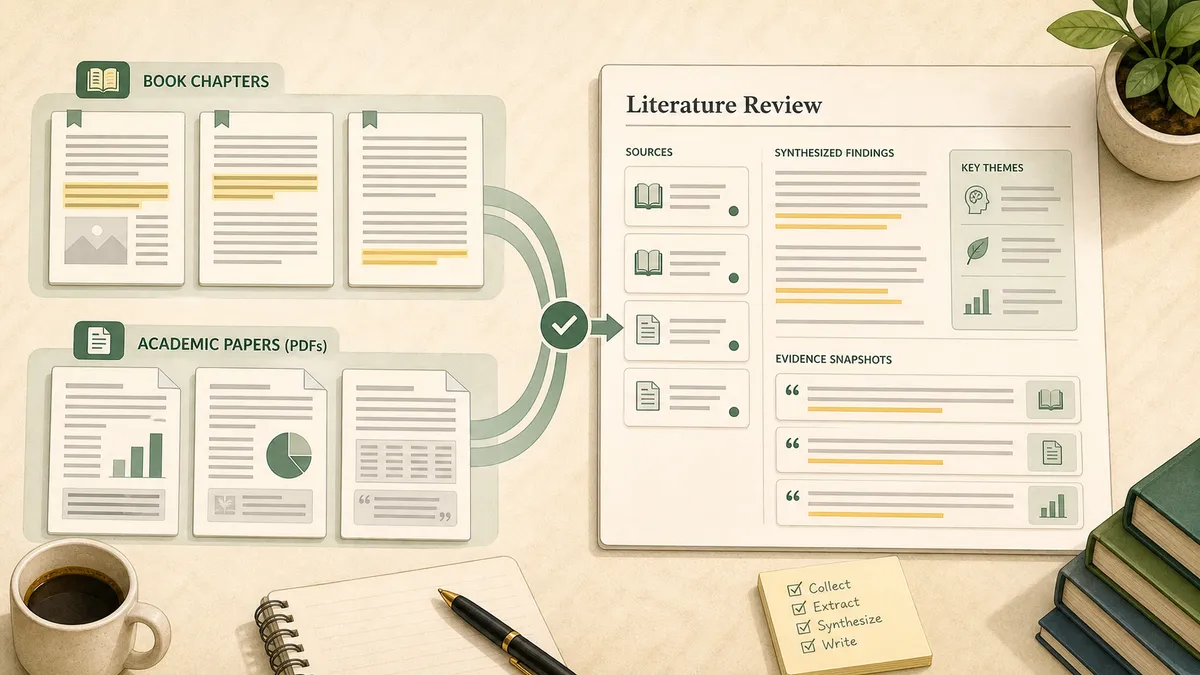
Cross-format triangulation means feeding book chapters and paper PDFs into one AI conversation so the synthesis spans both layers at once. No lit-review SaaS does this, because none of them ingest the book half. The pattern is the single biggest reason to bring TextMuncher into a researcher's stack.
Here is a worked example from my own notes:
- Extract three Kindle textbook chapters with TextMuncher (roughly 5,000 words each, 15,000 total).
- Collect six arXiv preprint PDFs (about 80,000 words).
- Collect eight journal-article PDFs (about 70,000 words).
- Upload all of it to a single Claude project (the Kindle to Claude page covers the extraction side of this setup). The total, near 165,000 words, sits well inside the 1M context.
- Run a thematic-synthesis prompt across the entire mixed corpus.
The prompt I use, verbatim:
"Across these sources, three textbook chapters, six preprints, and eight journal articles, identify the four or five themes that recur. For each theme, quote one supporting passage from a book chapter and one from a paper, with the source name and page or section. Flag where the book-length arguments and the paper findings disagree."
That last instruction matters. Books and papers often argue at different altitudes, and the places where a monograph's framing contradicts a recent preprint are exactly the tension points a good literature review is built to surface.
How Do You Compare an Argument Across Editions?
You compare an argument across editions by extracting each edition's relevant chapter, dropping them into one AI conversation, and asking the model to track what changed. This is a chronological-synthesis move that paper-database tools cannot perform at all, since textbook editions are not indexed in PubMed, arXiv, or Semantic Scholar.
It comes up more than you would expect. Tracing how a methods textbook treated a concept across editions one, two, and three over twenty years is a standard move in historiography and in any field auditing how its own consensus shifted. The workflow:
- Extract the same chapter from each edition with TextMuncher.
- Upload all three texts into one Claude project.
- Prompt: "Compare how the chapter on [X] evolved across these three editions. What was added, what was cut, which arguments hardened, and where did new hedges appear?"
Claude's context window holds three to five editions in one conversation, so the comparison runs in a single pass rather than as a stack of separate summaries you then have to reconcile by hand.
Pulling Citation-Ready Quotes From Book Chapters
To locate candidate quotes from a book, extract the full chapter text, paste it into your AI tool, and ask it to identify passages with page context. Then verify every quotation and locator against the source page. Lit-review SaaS can extract DOI metadata from journal uploads, but they do not provide source-verified block quotes from a book chapter. The extract-then-check workflow fills that gap.
The prompt:
"Find five block quotes about [X] in this chapter. For each, give the exact quote, the page number, and a one-line note on how it supports the argument. Format each in APA."
One discipline point: AI tools hallucinate citations, and this is the load-bearing risk in any AI-assisted review. The guardrail is to feed the actual extracted text in, with page numbers intact, and spot-check every block quote against the source page before it lands in your draft. Page-level accuracy is precisely why text extraction beats pasting screenshots, where a second vision-OCR pass mangles proper nouns and quote integrity. I covered that accuracy gap in why text beats screenshots for AI analysis. The method behind that claim is public: see the published OCR benchmark and its method.
How Do You Get Kindle Book Text Out for an AI Review?
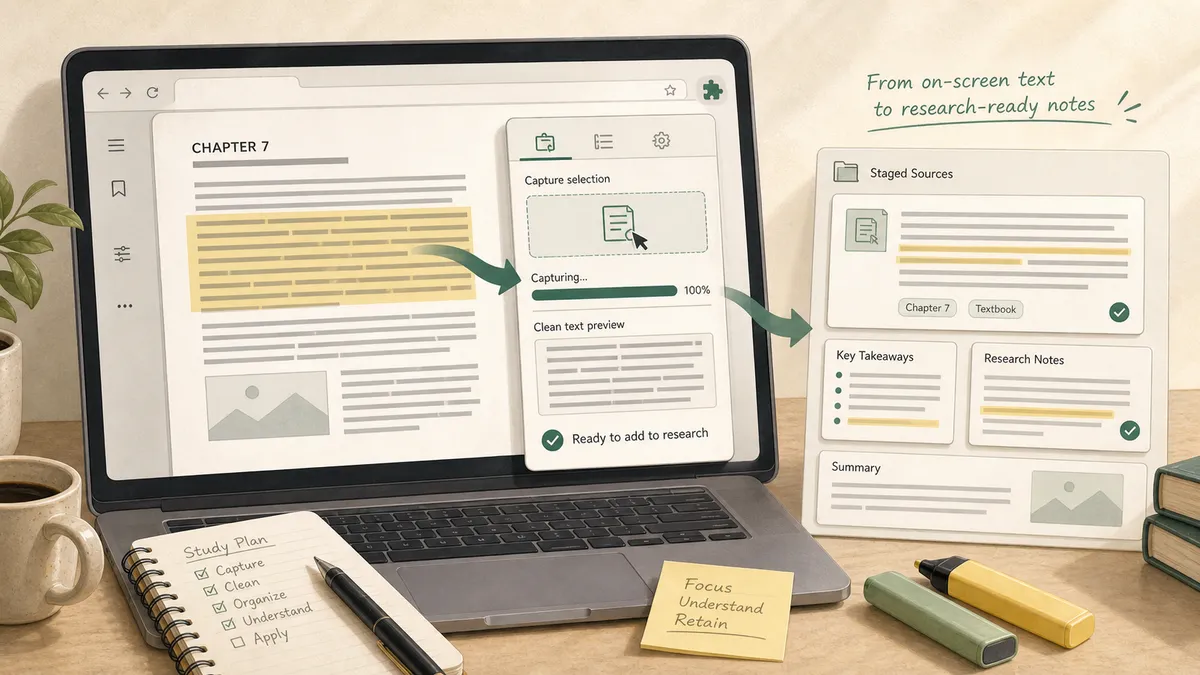
You get Kindle book text out by capturing the rendered Cloud Reader pages and running OCR on them, because Amazon's copy cap blocks selection at around 10% of any book. There are two paths, and the choice is about volume.
For a handful of pages, manual screenshot plus a free OCR tool works. For a full chapter or a stack of books, that breaks down fast: a 200-page book is 200 screenshots and hours of click-by-click work. This is the wall behind Amazon's 10% notebook-export cap, which is my top-performing post because so many readers hit it on the way to exactly this kind of research.
TextMuncher automates page turning and screenshot capture in Kindle Cloud Reader, then the web app OCRs the batch. Standard prose typically extracts cleanly, but quotations and citations still need source verification. Capture and OCR time vary with page count, page rendering, and device performance. The output is plain text, so it feeds any tool in your stack. If you want the product-side detail, the extract Kindle books for your AI literature review page covers it, and there is a dedicated PhD-researcher persona page for that workflow specifically.
The 2026 Literature Review Stack
The best AI literature review setup is not one tool, it is a stack where each tool owns a sub-task and TextMuncher feeds the book layer into all of them. Here is how the pieces fit:
| Sub-task | Tool that fits |
|---|---|
| Paper discovery and screening | Elicit, Consensus, Semantic Scholar |
| Citation-network mapping | ResearchRabbit, Litmaps |
| Systematic-review screening at scale | Rayyan |
| Grounded multi-source Q&A with page-level citations | NotebookLM |
| Fast topical orientation, current web | Perplexity Deep Research |
| Long-form synthesis across the whole corpus | Claude (1M-token context) |
| Book-chapter extraction into any of the above | TextMuncher |
Read this as complementary, not competitive. Elicit is excellent at paper screening and reportedly cuts initial review time by up to 70%. NotebookLM grounds answers in your uploaded sources with page-level citations. Perplexity Deep Research orients you on an unfamiliar topic in minutes. When your sources include Kindle textbooks, TextMuncher is the extraction layer that bridges those books into whichever of these tools you already run. For the broader, tool-agnostic version of this workflow, see how to read Kindle books with AI, and for the Claude-specific setup, the Kindle books with Claude guide.
When TextMuncher Isn't the Answer
TextMuncher is the wrong tool when your review is entirely peer-reviewed papers. If every source is a journal article or preprint, Elicit, Consensus, and Rayyan are the better front door, because they screen, rank, and map papers in ways a raw-text extractor never will. TextMuncher enters only when a source is a book chapter that those databases cannot reach.
A few honest limits. TextMuncher captures what is already rendered on your own screen in Kindle Cloud Reader. It does not crack DRM, does not touch Amazon's servers, and does not decrypt .azw or .kfx files. It also does not generate citations from thin air, so the spot-check-against-source step is still on you. Extracting books you own for personal research generally sits inside fair use, the same frame as photocopying a chapter for study; republishing or selling the extracted text does not.
The bottleneck in an AI literature review that spans books and papers is always the same: getting the book text out. Solve that once with extraction, and the rest of your stack, from paper screening to long-form synthesis, finally has the full picture to work from.
FAQ
Can I use Elicit or ResearchRabbit for a literature review on Kindle books?
Not directly. Elicit indexes 125M+ academic papers from sources like PubMed and Semantic Scholar, and ResearchRabbit covers over 270 million papers. Neither accepts Kindle books, EPUBs, or monograph chapters as source material. For a review that includes book-length sources, common in humanities, qualitative methods, and theoretical social science, you extract the book text first, then feed it to a tool that handles long-form synthesis, such as Claude, NotebookLM, or Perplexity. TextMuncher OCR-extracts Kindle Cloud Reader pages so you can paste the resulting text into your AI tool of choice.
How many books can Claude analyze at once for a literature review?
The current-generation Opus and Sonnet models support a 1M-token context window, roughly 750,000 words at Anthropic's ~0.75 words-per-token convention. That is about five to seven average non-fiction books in one conversation, or 40 to 50 papers plus two textbooks, or a full dissertation with its bibliography. Older models sat at 200K tokens, around 150,000 words, or one 400-page book. For a humanities review with six monographs and twenty journal articles, the current context line handles the whole corpus in a single session. Check Anthropic's live docs on the day you work, since this number moves.
Does NotebookLM accept Kindle books?
NotebookLM accepts PDFs, Google Docs, text files, websites, YouTube videos, and audio, up to 50 sources per notebook at 500,000 words each. It does not accept Kindle's .azw or .kfx formats, which are DRM-encrypted. The working pattern is to extract your Kindle chapter to text, via TextMuncher's OCR or a DRM-free EPUB if you own one, save it as a .txt or .pdf, and upload it as a source. NotebookLM then treats the book chapter like any other source: page-level citations, Audio Overviews, and multi-source Q&A across your full notebook all work.
Will AI hallucinate citations in my literature review?
Yes, and it is the most-documented risk in AI-assisted reviews. ChatGPT and Claude both generate plausible-looking references that do not exist or that misattribute claims. NotebookLM grounds responses in your uploaded sources with page-level citations but can still misattribute a passage. Paper-database tools like Elicit and Consensus reduce the risk for the paper layer because they synthesize only from a verified corpus. For the book layer there is no equivalent ground-truth index, so the reliable workflow is to feed the full extracted text in and spot-check every block quote against the source page before it reaches your draft.
For book-heavy seminars and courses, the Kindle course-reading guide links this research workflow to cross-reading comparison, citation checks, and exam preparation.
Want to fold your Kindle library into an AI literature review? Try TextMuncher free (30 pages included, no credit card).